
Ultimate Prompt Creator User Guide
Use the Ultimate Prompt Creator (free, no signup):
Read the entire article or jump straight to what interests you most:
UPC User Guide
1. Starting screen guidance
2. Clarifying questions
3. Copy-paste the final output into your AI tool
4. Iterate until you’re satisfied
Final word
- - -
UPC Quick Start
If you want to get started right away, the process is self-explanatory:
Simply describe what you want (in everyday language)
Optionally answer clarifying questions
Copy your ready-to-use expert prompt and paste it into your favorite AI tool
Optionally iterate until you’re 100% satisfied
That’s it.
The fastest way to understand UPC? Just experiment.
Give it almost no input. Then give it a messy brain dump. Try different use cases. Try different AI tools with the same prompts. Test everything you can think of.
- - -
UPC User Guide
1. Starting screen guidance
After you’ve clicked on “Get Started”, you’ll see this welcome message:
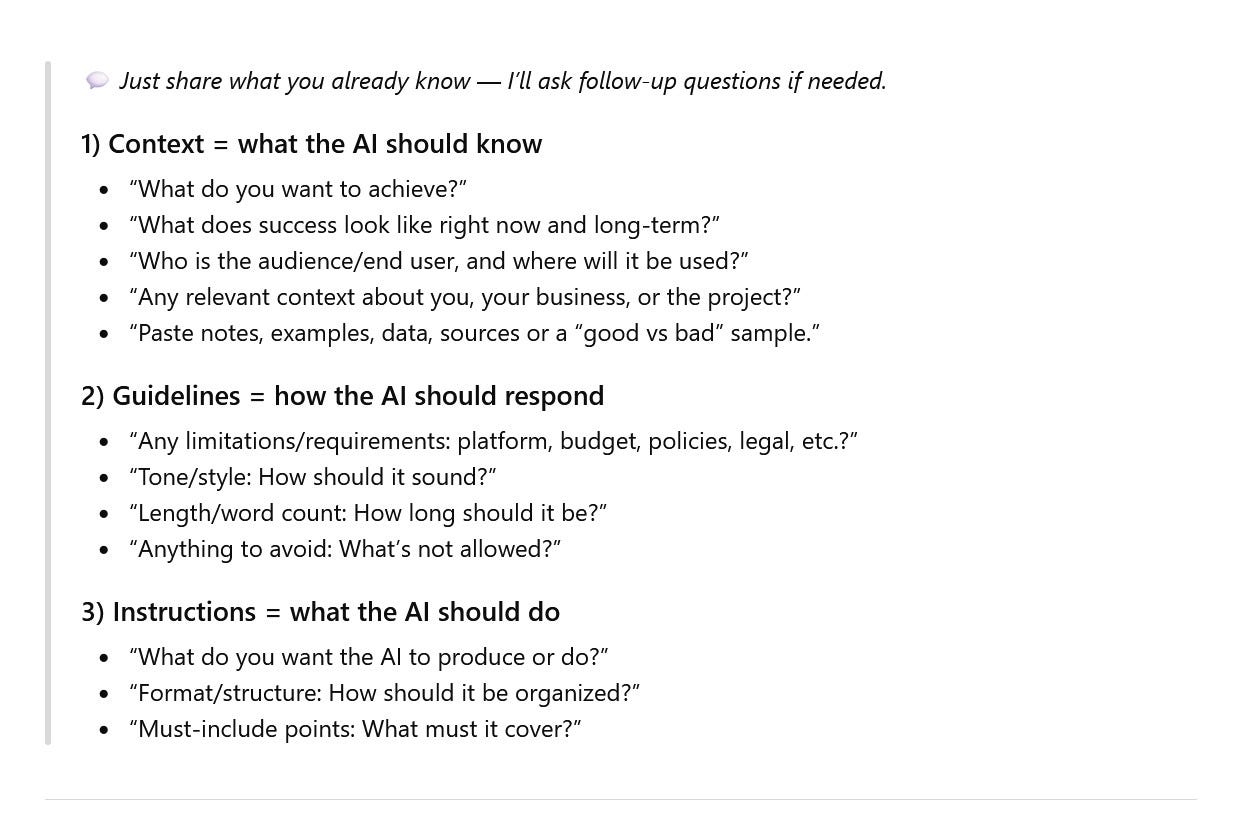
Most people have an idea in their head — but when it’s time to explain it to AI, they suddenly have no clue where to start.
That’s exactly what this starting message is for: guidance.
A few things to keep in mind:
You can answer every question in plain, everyday language
Some questions might not be relevant for your use case (that’s fine)
You can provide as much or as little info as you want
Be aware AI isn’t a mindreader (you can’t just assume it knows everything)
Also, don’t overcomplicate it — just drop everything you can think of. And if anything is unclear, UPC simply asks clarifying questions in the next step.
Even if you only give one sentence, UPC can still craft an impressive prompt — especially if you tell it something like “decide for me” (more on that later).
Just remember: input = output, and you’re part of that equation.
The more context you share, the more accurate and personalized the result becomes.
Think of a new colleague you need to guide: if you don’t explain what they need to do, it’s not fair to expect everything to go smoothly, right?
- - -
2. Clarifying questions
Based on your first input, UPC will ask clarifying questions. Here’s why:
So UPC truly understands what you’re aiming for
So you don’t forget important details AI needs
To personalize the results even further
Because we’re humans — we forget things, skip context, or say something in a way that makes perfect sense in our own head… but not to AI.
UPC helps by thinking for you, making sure it still gets what it needs so the final prompt contains everything required for AI to deliver its best work.
It tries to understand your intent, your situation, and what you’re actually trying to achieve before it locks anything in.
And last but not least: the “decide for me” mode.
This is a little trick to save time while still getting powerful instructions added to your prompt — the kind you probably wouldn’t have come up with yourself.
Just say “decide for me”, and UPC will make smart choices based on your input.
- - -
3. Copy-paste the final output into your AI tool
After answering the clarifying questions, UPC will automatically craft an expert prompt for you in seconds, including all the “professional ingredients”.
✓ A clear expert role for the AI
✓ A specific task and outcome
✓ Relevant background and constraints
✓ A defined audience and tone
✓ Guidance on what to avoid
✓ A logical, step-by-step structure
The clear instructions most people skip when they ‘just ask ChatGPT.’
Every prompt component — every instruction — is tailored to your goal.
That’s also the big difference with prompt templates:
No UPC prompt will ever be the same, because the instructions are always personalized to what you are trying to achieve.
The only thing you need to do is copy-paste it into your favorite prompt-based AI tool.
That can be ChatGPT, Claude, Gemini, Copilot, Perplexity — basically any AI tool that works with prompts (image, video, no-code, games, etc.).
- - -
4. Iterate until you’re satisfied
Tweaking the prompt is easy.
Just go back into the prompt-creation chat and tell UPC what you didn’t like or what you want to improve — for example:
“This is missing an important constraint: it must comply with [policy/platform/legal limitation].”
“The output misunderstood my goal — here’s what I meant: [clarification]. Fix the prompt accordingly.”
“Please change the output format: give me a checklist + a table instead of paragraphs.”
UPC will rewrite the prompt in seconds, ready to copy-paste again.
You can repeat this as many times as you want — until it’s exactly right.
- - -
Final word
With a little effort, you can already get great results — but put in real effort, and you can expect outstanding results.
That’s why you’ll be hearing me a lot about Context, Guidelines, and Instructions.
And if you look at the starting message of the Ultimate Prompt Creator, you’ll see it’s just a simple structure to ensure you give AI high quality first input to work with.
Context explains the situation.
Guidelines shape the answer.
Instructions define the task.
Think of this as the human thinking model — and the Ultimate Prompt Creator as the AI implementation that applies it automatically.